The Guide About OpenStack
2 PREFACE 前言
2.1 Abstract 摘要
The OpenStack system consists of several key services that are separately installed. These services work together depending on your cloud needs and include the Compute, Identity, Networking, Image, Block Storage, Object Storage, Telemetry, Orchestration, and Database services. You can install any of these projects separately and configure them stand-alone or as connected entities.
OpenStack系统由多个独立安装的关键服务组成。这些服务根据您的云需求一起工作,包括计算、身份、网络、图像、块存储、对象存储、遥测、编排和数据库服务。您可以单独安装这些项目中的任何一个,并将它们单独配置或作为连接实体配置。
Explanations of configuration options and sample configuration files are included.
包括配置选项和示例配置文件的说明。
Note: The Training Labs scripts provide an automated way of deploying the cluster described in this Installation Guide into VirtualBox or KVM VMs. You will need a desktop computer or a laptop with at least 8 GB memory and 20 GB free storage running Linux, MacOS, or Windows. Please see the OpenStack Training Labs.
注意:TrainingLabs 项目中体用了一个VirutalBox或KVM自动化安装和部署脚本,你需要一台台式机或笔记本电脑,至少有8gb内存和20gb空闲存储空间,运行Linux、MacOS或Windows。请查看OpenStack培训实验
This guide documents the installation of OpenStack starting with the Pike release. It covers multiple releases.
本指南记录了从Pike版本开始的OpenStack安装过程。 它涵盖了多个版本。
Warning: This guide is a work-in-progress and is subject to updates frequently. Pre-release pack- ages have been used for testing, and some instructions may not work with final versions. Please help us make this guide better by reporting any errors you encounter.
警告:本指南还未完成,经常会更新。预发布包已经用于测试,一些说明可能不适用于最终版本。请通过报告您遇到的任何错误来帮助我们更好地完成本指南。
2.2 Operatting Systems 操作系统
Currently, this guide describes OpenStack installation for the following Linux distributions:
目前本指南介绍了以下Linux发行版的OpenStack安装场景:
openSUSE and SUSE Linux Enterprise Server : You can install OpenStack by using packages on openSUSE Leap 42.3, openSUSE Leap 15, SUSE Linux Enterprise Server 12 SP4, SUSE Linux Enterprise Server 15 through the Open Build Service Cloud repository.
Red Hat Enterprise Linux and CentOS: You can install OpenStack by using packages available on both Red Hat Enterprise Linux 7 and 8 and their derivatives through the RDO repository.
note:
OpenStack Wallaby is available for CentOS Stream 8. OpenStack Ussuri and Victoria are available for both CentOS 8 and RHEL 8. OpenStack Train and earlier are available on both CentOS 7 and RHEL 7.
Wallaby 支持 Centos Stream 8, Ussuri 和Victoria 支持 CentOS8和RHEL 8,Train和更早版本支持Centos7和 RHEL 7.
OpenStack Wallaby is available for CentOS Stream 8. OpenStack Ussuri and Victoria are available for both CentOS 8 and RHEL 8. OpenStack Train and earlier are available on both CentOS 7 and RHEL 7.
Ubuntu : You can walk through an installation by using packages available through Canonicals Ubuntu Cloud archive repository for Ubuntu 16.04+ (LTS).
Note: The Ubuntu Cloud Archive pockets for Pike and Queens provide OpenStack packages for Ubuntu 16.04 LTS; OpenStack Queens is installable direct using Ubuntu 18.04 LTS; the Ubuntu Cloud Archive pockets for Rocky and Stein provide OpenStack packages for Ubuntu 18.04 LTS; the Ubuntu Cloud Archive pocket for Victoria provides OpenStack packages for Ubuntu 20.04 LTS.
3. Get Start With OpenStack
The OpenStack project is an open source cloud computing platform for all types of clouds, which aims to be simple to implement, massively scalable, and feature rich. Developers and cloud computing tech- nologists from around the world create the OpenStack project.
OpenStack项目是一个面向各类云的开源云计算平台,其目标是实现简单、可大规模扩展、特性丰富。来自世界各地的开发人员和云计算技术专家创建了OpenStack项目。
OpenStack provides an Infrastructure-as-a-Service (IaaS) solution through a set of interrelated services. Each service offers an Application Programming Interface (API) that facilitates this integration. De- pending on your needs, you can install some or all services.
OpenStack通过一组相互关联的服务提供了IaaS *解决方案。每个服务都提供了一个API 来促进这种集成。根据您的需要,您可以安装部分或全部服务。
3.1 the openstack service 服务
The OpenStack project navigator lets you browse the OpenStack services that make up the OpenStack architecture. The services are categorized per the service type and release series.
通过 OpenStack项目导航器,您可以浏览组成OpenStack架构的OpenStack服务。服务按照服务类型和发布系列进行分类。
OpenStack Services
An OpenStack deployment contains a number of components providing APIs to access infrastructure resources. This page lists the various services that can be deployed to provide such resources to cloud end users.
OpenStack部署中包含大量组件,提供api访问基础设施资源。此页面列出了可以部署为云终端用户提供此类资源的各种服务。
Compute 计算服务
| Service | description |
|---|---|
| NOVA | Compute Service 计算服务 |
| ZUN | Container Service 容器服务 |
Hardware Lifecycle 硬件生命周期
| Service | Description |
|---|---|
| IRONIC | Bare Metal Provisioning Service |
| CYBORG | Lifecycle management of accelerators |
Storage 存储
| Service | Description |
|---|---|
| SWIFT | Object store 对象存储,类似于阿里云OSS,AWS S3 |
| CINDER | Block Storage 块存储 |
| MANILA | Shared filesystems |
Networking 网络
| Service | Description |
|---|---|
| NEUTRON | Networking 网络组件 |
| OCTAVIA | Load balancer 负载均衡 |
| DESIGNATE | DNS service |
Shared Services 基础共享服务
| Service | Description |
|---|---|
| KEYSTONE | Identity service |
| PLACEMENT | Placement service |
| GLANCE | Image service |
| BARBICAN | Key management |
Orchestration 服务编排
| Service | Description |
|---|---|
| HEAT | Orchestration |
| SENLIN | Clustering service |
| MISTRAL | Workflow service |
| ZAQAR | Messaging Service |
| BLAZAR | Resource reservation service |
| AODH | Alarming Service |
Workload Provisioning 工作负载配置
| Service | Description |
|---|---|
| MAGNUM | Container Orchestration Engine Provisioning |
| SAHARA | Big Data Processing Framework Provisioning |
| TROVE | Database as a Service |
| ##### Application Lifecycle 应用生命周期 |
| Service | Description |
|---|---|
| MASAKARI | Instances High Availability Service |
| MURANO | Application Catalog |
| SOLUM | Software Development Lifecycle Automation |
| FREEZER | Backup, Restore, and Disaster Recovery |
API Proxies
| Service | Description |
|---|---|
| EC2API | EC2 API proxy |
Web Frontend
| Service | Description |
|---|---|
| HORIZON | Dashboard |
3.2 The Openstack architecture
The following sections describe the OpenStack architecuture int more detail:
以下的章节将从更多细节上讲述OpenStack架构
3.2.1 Conceptual architecture 概念设计
The following diagram shows the relationships among the OpenStack services:
下面的流程讲述了Openstack各个服务之间的关系。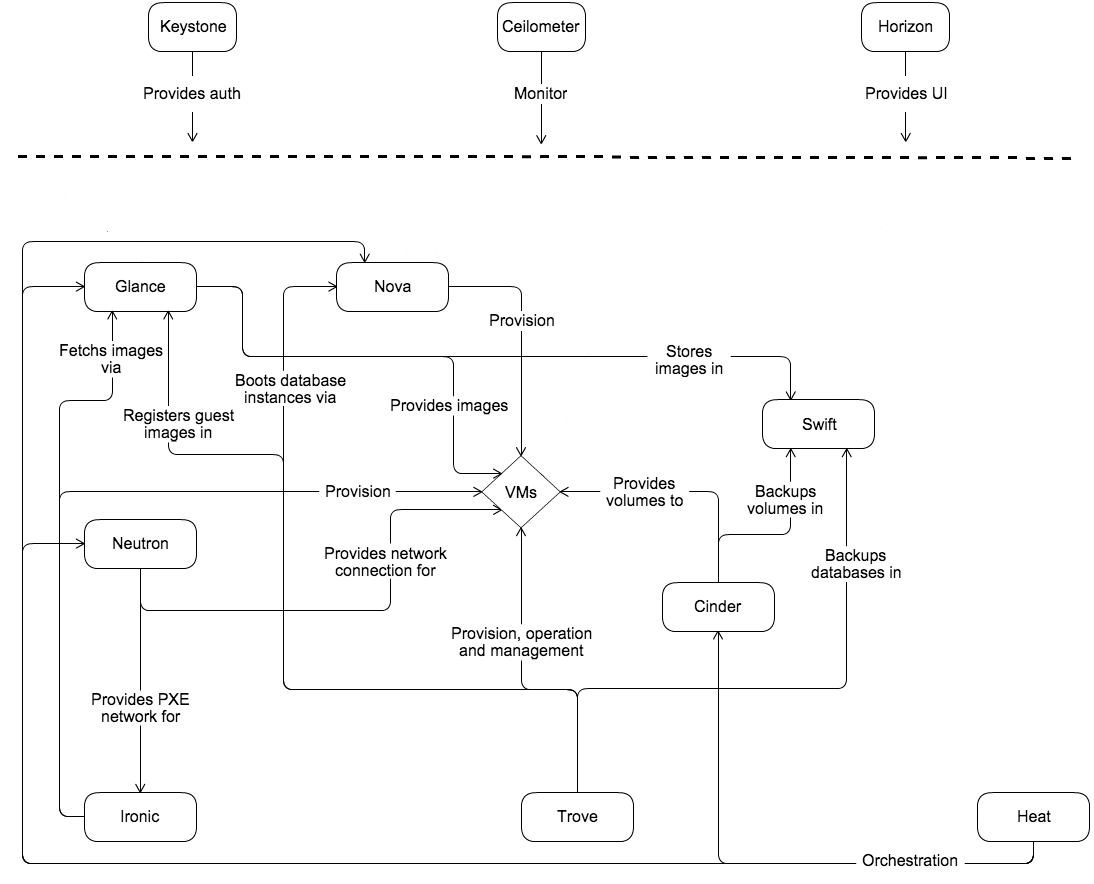
3.2.2 Logical architecture 逻辑架构
To design, deploy, and configure OpenStack, administrators must understand the logical architecture.
设计、部署或者配置Openstack管理补习理解逻辑架构。
As shown in Conceptual architecture, OpenStack consists of several independent parts, named the OpenStack services. All services authenticate through a common Identity service. Individual services interact with each other through public APIs, except where privileged administrator commands are necessary.
正如逻辑架构图锁展示的,OpenStack是由几个独立部分组成的,我们称之为OpenStack服务。所有服务的认证都是公用模块ID认证服务完成(keystore)。 各个服务通过公共api相互交互,除非需要特权管理员命令。
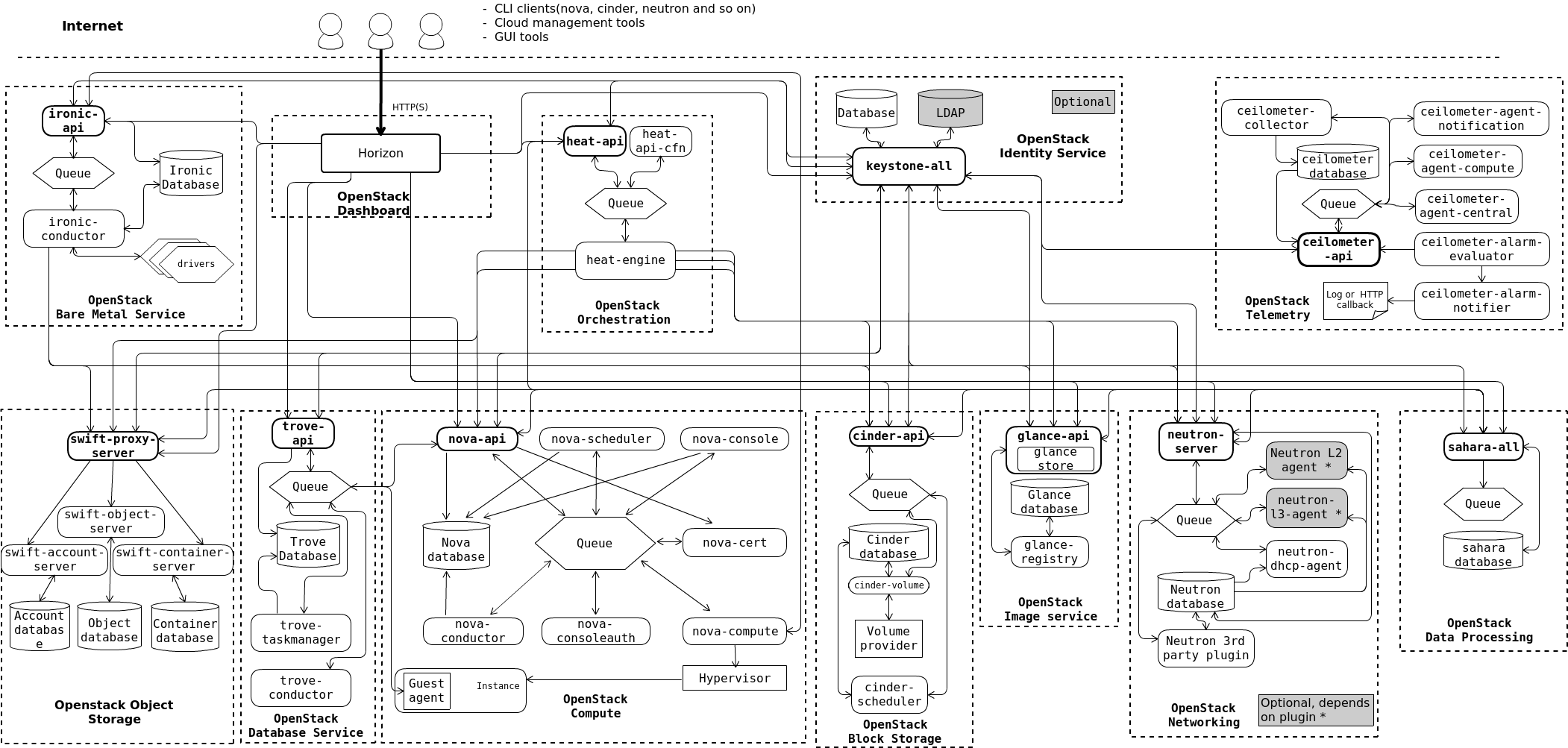
Internally, OpenStack services are composed of several processes. All services have at least one API process, which listens for API requests, preprocesses them and passes them on to other parts of the service. With the exception of the Identity service, the actual work is done by distinct processes.
OpenStack服务内部由多个进程组成。所有服务都至少有一个API进程,该进程侦听API请求,对它们进行预处理,并将它们传递给服务的其他部分。除了Identity服务之外,实际工作是由不同的流程完成的。
For communication between the processes of one service, an AMQP message broker is used. The service’s state is stored in a database. When deploying and configuring your OpenStack cloud, you can choose among several message broker and database solutions, such as RabbitMQ, MySQL, MariaDB, and SQLite.
对于一个服务的进程之间的通信,使用AMQP消息代理。服务的状态存储在数据库中。在部署和配置OpenStack云时,您可以选择多种消息代理和数据库解决方案,如RabbitMQ、MySQL、MariaDB和SQLite。
Users can access OpenStack via the web-based user interface implemented by the Horizon Dashboard, via command-line clientsand by issuing API requests through tools like browser plug-ins or curl. For applications, several SDKs are available. Ultimately, all these access methods issue REST API calls to the various OpenStack services.
用户可以通过Horizon Dashboard实现的基于web的用户界面,通过命令行客户端and,通过浏览器插件或curl等工具发出API请求)访问OpenStack。对于应用程序,几个sdk可用。最终,所有这些访问方法都会向各种
The following diagram shows the most common, but not the only possible, architecture for an OpenStack cloud:
下图展示了OpenStack云最常见的,但不是唯一可能的架构:
4. Overview
The OpenStack project is an open source cloud computing platform that supports all types of cloud environments. The project aims for simple implementation, massive scalability, and a rich set of features. Cloud computing experts from around the world contribute to the project.
OpenStack项目是一个开源的云计算平台,支持所有类型的云环境。该项目的目标是简单的实现、大规模的可伸缩性和一组丰富的特性。来自世界各地的云计算专家为该项目做出了贡献。
OpenStack provides an Infrastructure-as-a-Service (IaaS) solution through a variety of complementary services. Each service offers an Application Programming Interface (API) that facilitates this integration.
OpenStack通过多种补充服务提供了 IaaS 解决方案。每个服务都提供了一个应用程序编程接口(API)来促进这种集成。
This guide covers step-by-step deployment of the major OpenStack services using a functional example architecture suitable for new users of OpenStack with sufficient Linux experience. This guide is not intended to be used for production system installations, but to create a minimum proof-of-concept for the purpose of learning about OpenStack.
本指南采用功能样例架构,详细介绍了主要OpenStack服务的逐步部署,适合具有Linux经验的OpenStack新用户使用。本指南不打算用于生产系统安装,而是为了解OpenStack提供一个最小的概念验证。
After becoming familiar with basic installation, configuration, operation, and troubleshooting of these OpenStack services, you should consider the following steps toward deployment using a production architecture:
在熟悉这些OpenStack服务的基本安装、配置、操作和故障处理后,在使用生产架构部署时,需要考虑以下步骤:
- Determine and implement the necessary core and optional services to meet performance and re- dundancy requirements.
- 确定并实现必要的核心和可选服务,以满足性能和冗余需求。
- Increase security using methods such as firewalls, encryption, and service policies.
- 使用防火墙、加密和服务策略等方法提高安全性。
- Use a deployment tool such as Ansible, Chef, Puppet, or Salt to automate deployment and management of the production environment. The OpenStack project has a couple of deployment projects with specific guides per version:
- 使用部署工具(如Ansible、Chef、Puppet或Salt)来自动化生产环境的部署和管理。OpenStack项目有两个部署项目,每个版本都有特定的指南:
4.1 Example architecture 架构简单实例
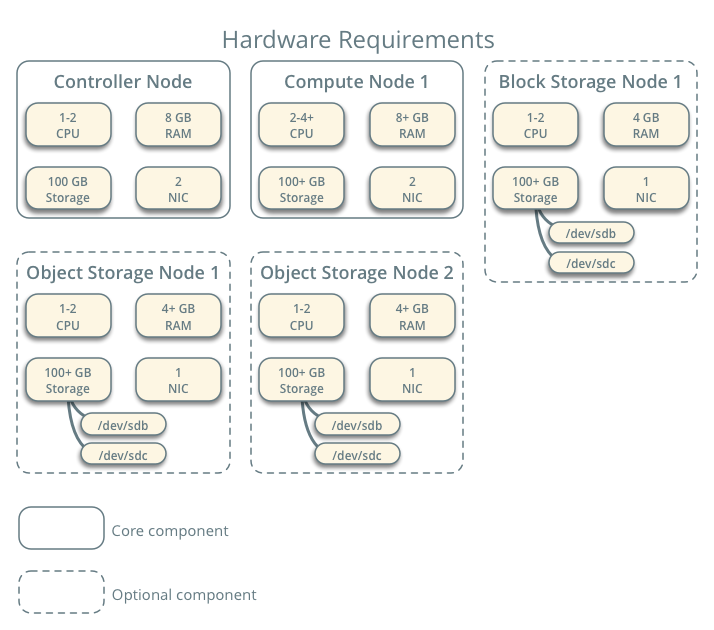
The example architecture requires at least two nodes (hosts) to launch a basic virtual machine or instance. Optional services such as Block Storage and Object Storage require additional nodes.
译文: 架构示例需要至少两个节点(主机)来启动基本的虚拟机或实例。块存储(Block Storage)、对象存储(Object Storage)等可选业务需要增加节点。
Important: The example architecture used in this guide is a minimum configuration, and is not in- tended for production system installations. It is designed to provide a minimum proof-of-concept for the purpose of learning about OpenStack. For information on creating architectures for specific use cases, or how to determine which architecture is required, see the Architecture Design Guide.
译文: 重要提示:本指南中使用的示例体系结构是最低配置,不适用于生产系统安装。它的目的是为学习OpenStack提供一个最小的概念验证。有关为特定用例创建体系结构的信息,或如何确定需要哪个体系结构的信息,请参见体系结构设计指南。
This example architecture differs from a minimal production architecture as follows:
译文: 这个示例架构不同于最小生产架构,如下所示:
- Networking agents reside on the controller node instead of one or more dedicated network nodes.
- 译文:网络代理驻留在控制节点上,而不是一个或多个专用网络节点上。
- Overlay (tunnel) traffic for self-service networks traverses the management network instead of a dedicated network.
- 译文:自服务网络的覆盖(隧道)流量穿过管理网络,而不是专用网络。
4.1.1 Controller 控制节点
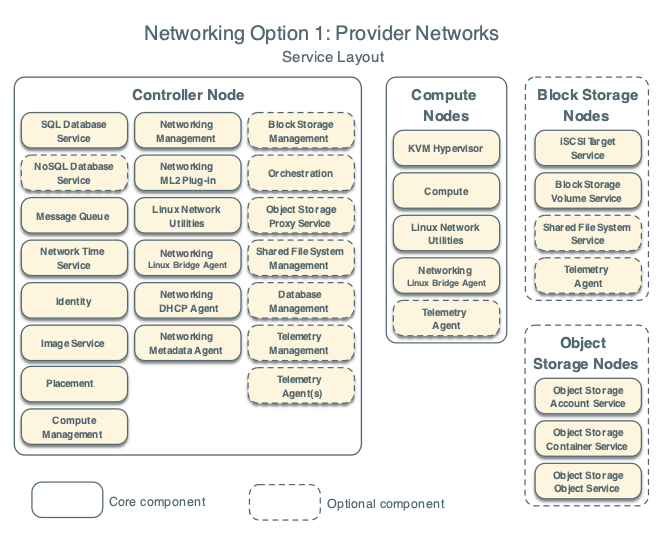
The controller node runs the Identity service, Image service, Placement service, management portions of Compute, management portion of Networking, various Networking agents, and the Dashboard. It also includes supporting services such as an SQL database, message queue, and NTP.
译文: 控制节点运行标识服务、映像服务、编排服务、计算的管理部分、网络的管理部分、各种网络代理和仪表板。它还包括支持的服务,如SQL数据库、消息队列和NTP 网络时间协议(时间同步)。
Optionally, the controller node runs portions of the Block Storage, Object Storage, Orchestration, and Telemetry services.
译文: 可选地,控制节点运行部分块存储、对象存储、编排和遥测服务。
The controller node requires a minimum of two network interfaces.
译文: 控制节点至少需要2个网口。
4.1.2 Compute 计算节点
The compute node runs the hypervisor portion of Compute that operates instances. By default, Com- pute uses the KVM hypervisor. The compute node also runs a Networking service agent that connects instances to virtual networks and provides firewalling services to instances via security groups.
译文: 计算节点运行compute的hypervisor部分,该部分操作实例。默认情况下,compute使用KVM虚拟化环境。计算节点还运行一个网络服务代理,该代理将实例连接到虚拟网络,并通过安全组向实例提供防火墙服务。
You can deploy more than one compute node. Each node requires a minimum of two network interfaces.
译文: 可以部署多个计算节点。每个节点至少需要2个网络接口。
4.1.3 Block Storage 块存储
The optional Block Storage node contains the disks that the Block Storage and Shared File System services provision for instances.
译文: 可选的“块存储”节点包含块存储和共享文件系统服务为实例提供的磁盘。
For simplicity, service traffic between compute nodes and this node uses the management network. Production environments should implement a separate storage network to increase performance and security.
译文: 为简单起见,计算节点与该节点之间的业务通信使用管理网络。生产环境应该实现单独的存储网络,以提高性能和安全性。
You can deploy more than one block storage node. Each node requires a minimum of one network interface.
4.1.4 Object Storage
The optional Object Storage node contain the disks that the Object Storage service uses for storing accounts, containers, and objects.
译文: 可选节点对象存储(Object Storage)包含对象存储服务(Object Storage service)用于存储帐户、容器和对象的硬盘。
For simplicity, service traffic between compute nodes and this node uses the management network. Production environments should implement a separate storage network to increase performance and security.
This service requires two nodes. Each node requires a minimum of one network interface. You can deploy more than two object storage nodes.
译文: 该服务需要两个节点。每个节点至少需要一个网络接口。可部署2个以上对象存储服务节点
4.2 Networking 网络
Choose one of the following virtual networking options.
选择以下虚拟网络选项之一。
4.2.1 Networking Option 1: Provider networks
The provider networks option deploys the OpenStack Networking service in the simplest way possible with primarily layer-2 (bridging/switching) services and VLAN segmentation of networks. Essentially, it bridges virtual networks to physical networks and relies on physical network infrastructure for layer-3 (routing) services. Additionally, a DHCP service provides IP address information to instances.
provider network选项以最简单的方式部署OpenStack Networking服务,主要采用二层(桥接/交换)服务和网络的VLAN分段。本质上,它连接了虚拟网络和物理网络,并依赖于物理网络基础设施来提供第三层(路由)服务。另外,DHCP服务为实例提供IP地址信息。
The OpenStack user requires more information about the underlying network infrastructure to create a virtual network to exactly match the infrastructure.
译文: OpenStack用户需要更多底层网络基础设施的信息,才能创建与底层网络基础设施完全匹配的虚拟网络。
Warning: This option lacks support for self-service (private) networks, layer-3 (routing) services, and advanced services such as LBaaS and FWaaS. Consider the self-service networks option below if you desire these features.
译文: 警告:此选项不支持自助服务(专用)网络、三层(路由)服务和高级服务,如LBaaS和FWaaS。如果需要这些功能,请考虑下面的自助网络选项。
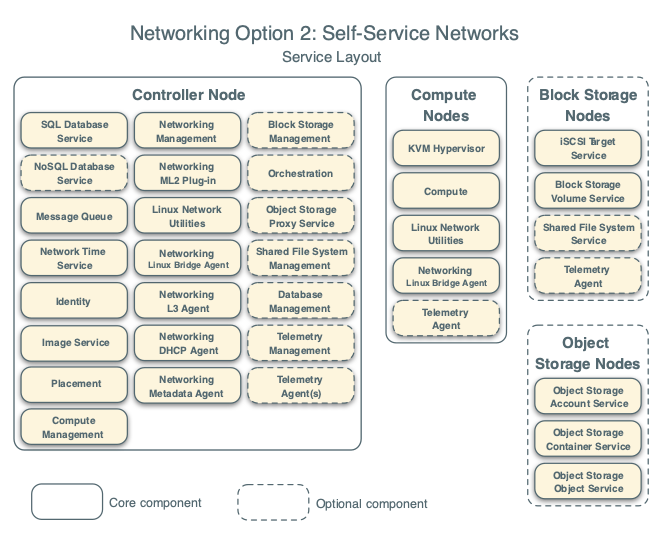
4.2.2 Networking Option 2: Self-service networks
The self-service networks option augments the provider networks option with layer-3 (routing) services that enable self-service networks using overlay segmentation methods such as VXLAN. Essentially, it routes virtual networks to physical networks using NAT. Additionally, this option provides the founda- tion for advanced services such as LBaaS and FWaaS.
译文: 自助服务网络选项为提供商网络选项增加了三层(路由)服务,这些服务使用覆盖性分割方法(如VXLAN)实现自助服务网络。本质上,它使用NAT*将虚拟网络路由到物理网络。此外,该选项为LBaaS和FWaaS等高级服务提供了基础。
The OpenStack user can create virtual networks without the knowledge of underlying infrastructure on the data network. This can also include VLAN networks if the layer-2 plug-in is configured accordingly.
译文: OpenStack用户可以在不了解数据网络底层基础设施的情况下创建虚拟网络。如果配置了相应的二层插件,也可以包括VLAN网络。
5 ENVIRONMENT
This section explains how to configure the controller node and one compute node using the example architecture.
译文: 本节以配置控制节点和1个计算节点为例进行说明。